
Picture two schools down the road from each other. One keeps its student records on a server tucked in a cupboard in the office. The other runs everything from the cloud, reachable from any phone, anywhere. That’s the real choice behind cloud-based ERP vs. on-premise. Both systems handle admissions, attendance, fees, and report cards. But they work in very different ways. This guide breaks the differences down in plain language—cost, security, growth, and setup time—so you can pick the right one for your school.
Cloud-Based ERP vs On-Premise: Side-by-Side Comparison
For clarity, here’s everything above, side by side, in one place.
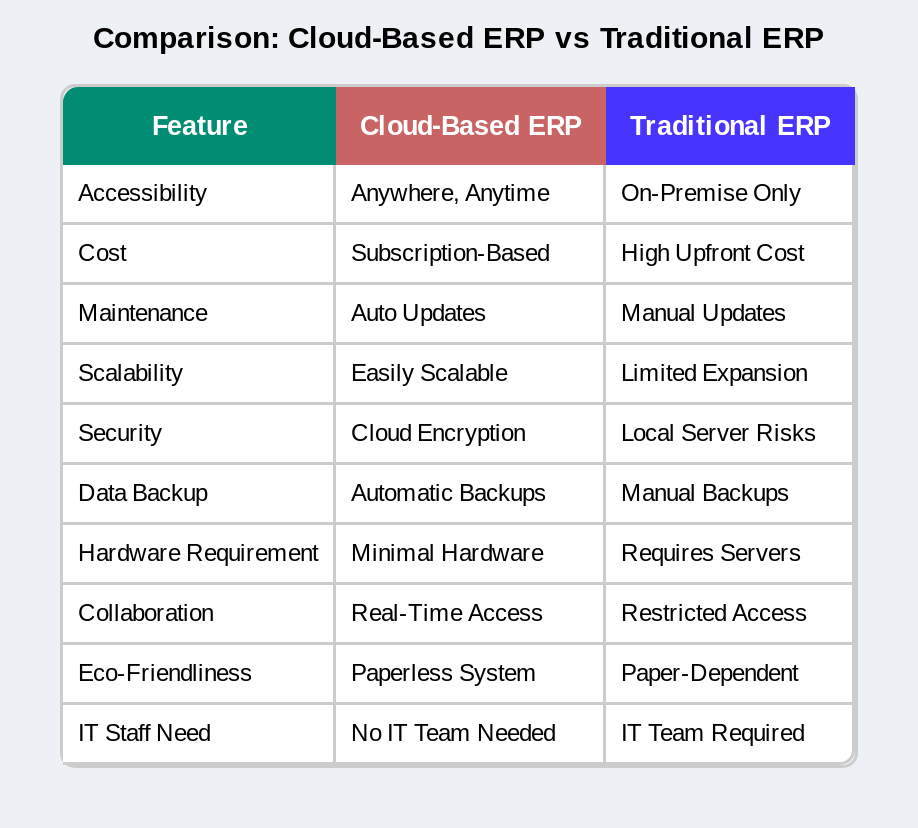 Put simply, this is why most CBSE, ICSE, and state board schools, especially in Tier 2 and Tier 3 cities without big IT teams, are moving away from on-premise systems toward cloud ERP.
What Is the Difference Between Cloud ERP and On-Premise ERP?
Think of it like renting a flat versus buying a house. Cloud ERP is the rented flat: you move in, and the landlord, the software provider, fixes whatever breaks. On-premise ERP is the house you own outright: more control, but you’re also the one calling the plumber at midnight.
In practical terms, a cloud-based ERP lives on a provider’s servers and works through the internet. You log in from a phone, tablet, or laptop, while the data sits somewhere else, managed by someone else. An on-premise ERP, on the other hand, lives inside your school. The software sits on a physical server in your building, and you can usually only reach it from your school’s own network. NIST defines cloud computing as on-demand access to a shared pool of computing resources, which is exactly the idea behind a cloud school ERP.
So the real difference isn’t features. It’s where the system lives and who’s responsible when something goes wrong. MySmartSchool, for example, runs the same modules either way—admissions, fee management, timetables, and a parent app. As a cloud ERP, though, it removes the headache of hosting all that on school property.
Cost Comparison: Cloud ERP vs On-Premise Software
Cost is usually the first question a principal asks. So let’s start there.
Upfront Setup Costs
On-premise software costs a lot before it even works. You need servers, networking gear, and a software license, all paid for before a single student record goes in. Cloud ERP skips most of that. Instead, you pay a yearly subscription, so there’s no big bill on day one.
There are lots of affordable cloud-based school ERP systems like MySmartSchool, Entab, Fedena, and many more.
Long-Term Maintenance Costs
On-premise systems also need looking after. That usually means hiring IT staff or signing an annual contract to keep the servers running and patched. Cloud ERP hands that job to the provider instead. As a result, schools in smaller cities, where finding good IT staff is genuinely hard, often save more with cloud ERP over three to five years, even if the on-premise price looks lower at first glance.
Accessibility: Remote Access vs On-Site Only
Where can you actually use the system? In short, that’s what accessibility really comes down to.
Cloud ERP works from any phone, tablet, or laptop, anywhere there’s internet. So a teacher can mark attendance from home, and a parent can check fee dues from the bus. On-premise ERP, however, is usually locked to the school’s own network, unless someone sets up and maintains a VPN. That makes it far less convenient for busy parents and staff who aren’t always on campus.
Data Security and Backup: Cloud vs On-Premise
Security isn’t optional anymore, especially with India’s growing focus on data protection. The Digital Personal Data Protection Act, 2023, requires every organization handling personal data, schools included, to keep it reasonably safe. Both systems have to meet that bar, just in different ways.
A good cloud ERP provider encrypts your data and backs it up automatically, every day, across multiple servers. So if one server fails, your data still exists somewhere else. On-premise ERP puts that entire job on your school’s own server room. If that one server is damaged, stolen, or hit by a power cut, and nobody backed it up that week, the records could be gone for good. In short, on-premise security is only as strong as your weakest habit.
Scalability: Which System Grows With Your School?
Will the system keep up as your school grows? Ultimately, that’s the real test.
Cloud ERP scales by adding more licenses or storage, often within minutes, with no new hardware needed. A school that grows from one branch into five can scale the same system across every campus. On-premise ERP grows differently: it means buying more servers, more storage, and sometimes more hardware-locked licenses. So a fast-growing school group has to plan and budget for new equipment well in advance or risk the system slowing down as more students join.
Software Updates and Downtime Compared
Of course, updates are easy to ignore until something breaks.
A cloud ERP provider pushes updates and security patches automatically, usually without anyone even noticing. Every school on the platform benefits at the same time. On-premise ERP needs a technician to install each update by hand, which usually means planned downtime. In many schools, those updates get delayed or skipped entirely simply because no one has the time. Eventually, the school ends up running outdated, less secure software, and nobody notices until something actually breaks.
Implementation Time: Cloud ERP vs On-Premise Rollout
How fast can you actually get up and running? It’s rarely discussed, but it can shape your entire academic year.
Typically, a cloud ERP can go live in one to three weeks, since there’s no hardware to install and everything runs on the provider’s own servers. Their team imports your data, sets up accounts, and trains your staff, often over a video call. On-premise rollout takes much longer, usually several weeks to a few months, since it depends on buying servers, installing them on-site, and setting up the network before any data even moves in. If you’re trying to launch before the new academic year starts, this gap alone can decide which system you pick.
Which Should Your School Choose?
For most schools, this isn’t a hard call.
If your school has fewer than 3,000 students, no in-house IT team, and you’d rather pay a predictable amount every year, cloud ERP is almost always the better fit. If your school must follow strict rules that require on-site data storage, on-premise might still make sense, though that’s increasingly rare for K-12 schools today. Either way, it helps to compare school ERP features side by side first, since the right choice depends on what you’ll actually use, not just where the data sits.
Before signing anything, it also helps to ask three quick questions:
- Who fixes things when something breaks at 7 AM, right before class starts? With cloud ERP, that’s the provider’s job. With on-premise, it’s on you or whoever you’ve hired to manage it.
- What happens if you open a second campus next year? Cloud ERP scales with a few extra licenses. “On-premise” means buying more hardware and setting it up all over again.
- What does downtime actually cost you in lost time and angry parent calls? Once schools work out this number honestly, it usually settles the decision.
Schools that want to move away from manual fee registers can also explore a dedicated school fees management system, which works as part of a complete cloud ERP, not as a separate tool you have to manage on the side.
FAQs About Cloud-Based ERP vs On-Premise
What’s the real difference between cloud-based ERP and on-premise ERP?
Cloud-based ERP runs on a provider’s servers and works through the internet. On-premise ERP runs on a server inside your school, reachable only through your local network.
Cloud-based ERP vs. on-premise: Which one costs less over time?
Cloud ERP is usually cheaper over three to five years, since it skips big upfront hardware costs and ongoing IT salaries. On-premise software might look cheaper in year one until maintenance costs start adding up.
Is cloud-based school ERP safe enough for storing student and fee data?
Yes. A reputable cloud ERP provider encrypts your data, controls who can access it, and backs it up automatically across several servers, usually far more than a single school server room can manage alone.
Can a school move from on-premise to cloud ERP without losing data?
Yes. Most providers handle the move for you, importing student records, fee history, and academic data from your old system and checking everything with you before switching the old one off.
How long does it actually take to set up a cloud ERP versus an on-premise system?
A cloud ERP usually goes live in one to three weeks. An on-premise system takes much longer, often several weeks to a few months, because of the hardware and on-site setup involved.
Does cloud-based ERP still work if the internet goes down?
Most cloud ERP systems need an internet connection to work in real time. Some offer limited offline features, like marking attendance, which then sync once the connection is back.
Summarizing up
Look at cloud-based ERP vs on-premise honestly, and cloud wins on cost, ease of access, security, growth, and setup speed for almost every school below the very largest. On-premise ERP still makes sense in a few cases, mostly where strict rules demand on-site data storage. But that list keeps getting shorter every year, as cloud security keeps improving. So if you’re choosing your next ERP, start by looking at cloud-based options first, and only consider on-premise if there’s a real, documented reason that calls for it.
Ready to make the switch? Book a free demo to see a cloud-based school ERP in action, or check current pricing plans to compare costs against what you’re paying now for an on-premise setup.
Upgrade to MySmartSchool today and experience the future of school management!
Book a Free Demo.