
It’s the first week of term, and the front office is buried under blank ID templates, a stack of student photos, and a laminating machine that jams every third card. That’s the exact problem this kind of software exists to solve.
Instead of designing each card by hand in Word or Canva, the software pulls student data and photos straight from your school records, applies a template, and prints hundreds of cards in one batch. This guide covers what student ID card software does, the features that matter, and how to choose the right one for your school.
What Is Student ID Card Software?
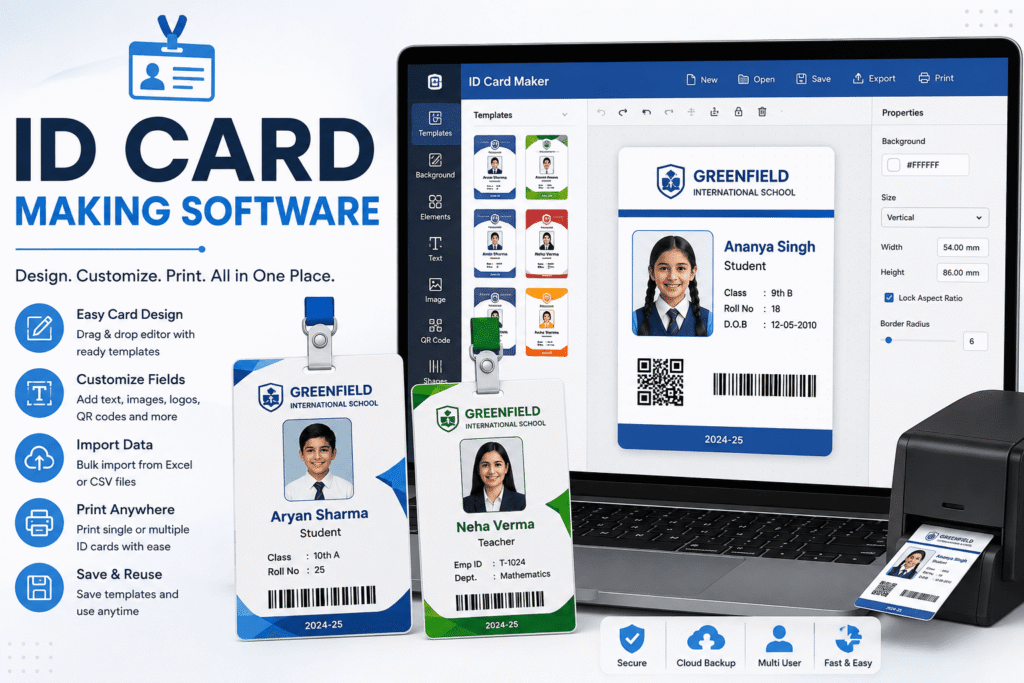
This software is a tool that generates ID cards directly from your school’s existing student database, instead of treating each card as a separate design project.
It pulls the student’s name, class, photo, and roll number automatically. Then it applies your school’s template and branding and exports cards ready for printing—one at a time, or all 800 at once before the new term starts.
Why Schools Need Dedicated ID Card Software
Most schools start out designing ID cards in Word, Canva, or a local print shop’s template. It works until the school crosses a few hundred students.
Manual design breaks down fast at scale. A single spelling mistake in a student’s name means reprinting one card by hand, hunting through files to find the right photo again. Multiply that across 50 mid-year transfers and a fresh admission batch, and the front office loses days every term to a task that should take minutes.
Dedicated software removes the guesswork. Since it pulls directly from the same database used for admissions and attendance, a name typed once stays correct everywhere, including on the card.
It also handles the parts schools forget to plan for: replacement cards for lost ones, fresh cards for mid-year transfers, and a different template for staff versus students, all from the same system instead of three separate workflows.
Key Features to Look For in ID Card Software
Not every “ID card maker” is built for how schools actually operate. Here’s what to check before choosing one.
Bulk ID Card Generation
The software should generate cards for an entire class, or the whole school, in one batch. So instead of opening 800 separate files, you select a class list and print the run.
Customizable Templates and Branding
Good software lets you add your school’s logo, colors, and layout once, then reuses that template for every student automatically. Cards should still follow the standard ID-1 card size used worldwide, so they fit existing lanyards, holders, and printers without modification.
QR Codes and Barcodes for Safety
Each card should support a unique QR code or barcode tied to the student’s record. As a result, the same card can double as an attendance scan, a library card, or a gate-entry pass, instead of needing separate cards for each.
Printing and Export Options
The software should export print-ready PDFs for local printing or connect directly to a card printer for plastic ID cards. Either way, the export should match standard card dimensions exactly, with no manual resizing required.
How Smart ID Cards Improve School Safety
A QR-coded ID card does more than identify a student — it becomes part of the school’s safety system.
Front-gate staff can scan a card to confirm a child’s identity and class before releasing them at pickup time, rather than relying on memory or a printed list. Visitors and outside contractors stand out clearly against students and staff who all carry the same verified card design.
This kind of identity verification lines up directly with the NCPCR’s guidelines on school safety and security, which call for clear systems to confirm who is on campus at any given time. A barcode-based card turns that requirement into something front-desk staff can actually act on in seconds, not a policy that sits in a binder.
ID Card Software vs Manual Design
Many schools still rely on Word templates or a local printer for ID cards, simply because that’s familiar. So why move to dedicated software?
Manual design treats every card as a one-off file. There’s no link back to the student database, so updates to a student’s class or photo never sync automatically; someone has to redo the card by hand.
This software, by contrast, stays connected to live student records. Update a student’s class in the system once, and the next card printed reflects it instantly. For a small school issuing a handful of cards a year, manual design might still work. For a school onboarding hundreds of students every admission season, dedicated software turns a multi-day task into an afternoon.
Common ID Card Mistakes Schools Make (And How Software Fixes Them)
A handful of mistakes show up in almost every school still designing cards by hand—and dedicated software fixes each one by design.
- Reusing last year’s template without updating the class list. Cards go out with the wrong section or grade printed on them, and nobody notices until a parent points it out. Software pulls the current class list automatically, so the card always matches this year’s records.
- Typing student names manually into a design file. A single typo means redoing the card from scratch, and multiplying that across hundreds of students adds up fast. Software pulls names directly from verified student records, so the spelling is correct the first time.
- Printing cards without a QR or barcode. The card looks fine but does nothing beyond identification, missing the attendance and gate-entry use cases entirely. Software builds a unique code into every card automatically, with no extra design step.
- Losing track of which students still need a card. Mid-year admissions and transfers slip through the cracks without a clear list. Software flags new or updated student records automatically, so nobody gets missed.
Student ID Card Software: Side-by-Side Comparison
Here’s the comparison in one place.
| Factor | ID Card Software | Manual Design (Word/Canva) |
|---|---|---|
| Bulk generation | Yes, entire class in one batch | One card at a time |
| Synced with student records | Yes, updates automatically | No, manual re-entry needed |
| QR/barcode support | Built-in | Requires separate tools |
| Standard card sizing | Automatic, ID-1 compliant | Manual resizing risk |
| Time per 100 cards | Minutes | Hours |
| Error rate | Low, pulled from verified data | Higher, manual typing |
Put simply, manual design is fine for a handful of cards, but dedicated ID card software becomes the obvious choice the moment a school issues cards every term instead of once a year.
How to Choose the Right ID Card Software
Before committing to a tool, ask a few practical questions.
- Does it pull data from your existing student records or require a separate spreadsheet? A tool that needs manual re-entry defeats the purpose.
- Can it generate QR codes or barcodes, or just print a photo and name? A plain photo ID misses the safety and attendance use cases entirely.
- Does it support bulk printing for an entire class or school at once? One-at-a-time generation doesn’t scale past a small school.
- Will it export to a format your existing printer or print shop can use? Software that locks cards into one proprietary format limits your printing options later.
- Can it handle staff and visitor cards too, not just students? A school usually needs more than one card template, and switching tools for each one adds friction back in.
Schools comparing options can explore school ERP features to see how ID card generation fits alongside admissions and attendance in one system or check current pricing before deciding.
FAQs About Student ID Card Software
What is student ID card software used for?
It’s used to generate student identity cards automatically from existing school records, including photos, class details, and QR codes or barcodes, instead of designing each card by hand.
Can ID card software print cards in bulk?
Yes. Most ID card software generates an entire class or school’s cards in a single batch, rather than one card at a time.
Do student ID cards need a QR code or barcode?
Not strictly, but it helps. A QR or barcode lets the same card double as an attendance scanner pass or gate entry verification tool, not just a printed photo.
Is this kind of software connected to the school’s student database?
Yes, in most school ERPs. Since the card pulls live data, updates to a student’s class or photo reflect on the next printed card automatically.
Can ID card software handle replacement cards for lost IDs?
Yes. Most software lets you reprint a single card on demand, pulling the same verified record instead of recreating the design from scratch.
Does ID card software work with any printer?
Most software exports standard, print-ready files in the ID-1 card size, so they work with most card printers and local print shops without resizing.
Final Thoughts
Student ID card software turns a recurring, error-prone task into something that takes minutes instead of days. It pulls directly from verified student records, supports QR or barcode safety checks, and prints in bulk instead of one card at a time.
Schools that already run a digital ERP get the most value by keeping ID cards inside the same system as admissions and attendance, rather than treating cards as a separate yearly project. Ready to see how it fits into a complete school ERP? Book a free demo to see it in action.