
A timetable looks like very simple work to do, but actually it is very difficult. After completing the timetable, you will find new clashes at every recheck.
Good timetabling software doesn’t just fill slots.
It enforces CBSE period-count requirements, prevents a teacher from being double-booked across sections, allocates labs and smart classrooms fairly, handles substitute coverage automatically, and generates board inspection-ready reports in minutes.
The difference between a school using the right tool and one still working on spreadsheets isn’t just efficiency.
- It’s the quality of the academic experience students receive every day.
- It is the efficiency that teachers experience in daily tasks.
- It is the complexity turning into simplicity.
This guide evaluates the best timetable management systems available to CBSE schools in India in 2026.
CBSE schools today are managing more complexity than ever before.
The National Education Policy 2020 has introduced flexible subject combinations in classes IX–XII, meaning a student can pair economics with physics or pursue vocational NSQF courses alongside academic ones—each combination demanding its own scheduling logic.
The push for co-curricular activity periods, mandatory PT and yoga slots, and the ongoing 5-day school week debate adds further constraints. Meanwhile, schools are running larger—more sections, more electives, and more shared infrastructure—and parents and teachers alike now expect real-time communication when a schedule changes.
All these new policies are making the timetable system more complicated.
Manage your timetable with MySmartSchool: Book Free Demo.
What Makes CBSE Timetabling Unique?
CBSE schools operate under a specific set of regulatory and infrastructural constraints that generic tools simply weren’t designed for. Understanding these is the first step to choosing software that actually fits.
Mandated period counts per subject
CBSE circular guidelines specify minimum instructional time for each subject across classes. A school cannot freely reduce math periods in Class X to accommodate an extra activity slot—the count is auditable, and any shortfall shows up during board inspections. A good timetable management system wants a built-in period-count tracker that flags violations before the timetable is published, not after.
Many schools currently discover these gaps manually, mid-term, when little can be done about them.
The elective explosion in Classes XI and XII
NEP 2020 has significantly widened the subject combination matrix. A student in Class XI might choose Physics, Chemistry, Mathematics, and Physical Education—or History, Political Science, Economics, and Informatics practices.
Each combination requires a section or a carefully managed pool system where students from different base sections converge for elective classes.
This is one of the hardest scheduling problems in a school context because the software must simultaneously satisfy student-subject assignments, teacher availability, and room capacity—often across dozens of unique combinations in a single school.
Mandatory non-academic periods
CBSE schools are required to timetable periods for physical training, yoga or meditation, morning assembly, and, increasingly, life skills or value education.
These aren’t optional fillers—they need to appear at specific frequencies across the week, be distributed fairly across sections, and not cannibalize subject periods.
A timetable tool that treats all periods as interchangeable will either misplace these or force an administrator to manually verify every week.
Shared and scarce infrastructure
Most CBSE schools have one or two science labs, a single computer lab, a library, and one or two smart classrooms, all of which need to be shared across multiple classes and subjects.
Scheduling a Class IX biology practical in Lab 1 while Class XI chemistry is already assigned there is the kind of conflict that causes real disruption on the ground.
So, the periods must be assigned in such a way that every class gets the right time with the right instructor.
Teacher allocation rules and workload norms
CBSE schools follow workload norms that limit the number of teaching periods per teacher per day and per week. Beyond the regulatory floor, there are practical concerns: a teacher assigned six consecutive periods without a break or given a split shift across morning and afternoon sessions will flag it—and rightly so. Timetabling software needs to respect both the hard regulatory limits and configurable soft preferences, like keeping free periods away from the edges of the day or ensuring no teacher has more than four consecutive teaching periods.
Online Time-Table Management System vs Manual Time Table Management System
| Feature | Online Time-Table Management System | Manual Time Table Management System |
| Creation Speed | Generates schedules quickly using automation | It takes a lot of time to prepare manually |
| Error Handling | Automatically detects clashes and conflicts | Higher chances of human errors |
| Editing & Updates | Easy to update instantly | Requires rewriting or printing again |
| Accessibility | Accessible anytime through mobile or computer | Limited to printed copies or notice boards |
| Teacher Allocation | Smart teacher and subject allocation | Manual adjustments needed |
| Student Notifications | Sends instant updates and alerts | No automatic notification system |
| Data Storage | Secure cloud-based storage | Records can be lost or damaged |
| Cost Efficiency | Saves long-term administrative costs | Repetitive printing and paperwork expenses |
| Accuracy | High accuracy with automation | It depends completely on manual effort |
| Scalability | Suitable for schools with many classes | It is difficult to manage large institutions |
| Integration | Can integrate with ERP, attendance, and exams | No integration capabilities |
| Report Generation | Automatic timetable reports and analytics | Reports must be created manually |
Key Features to Evaluate in a CBSE Timetable Management System
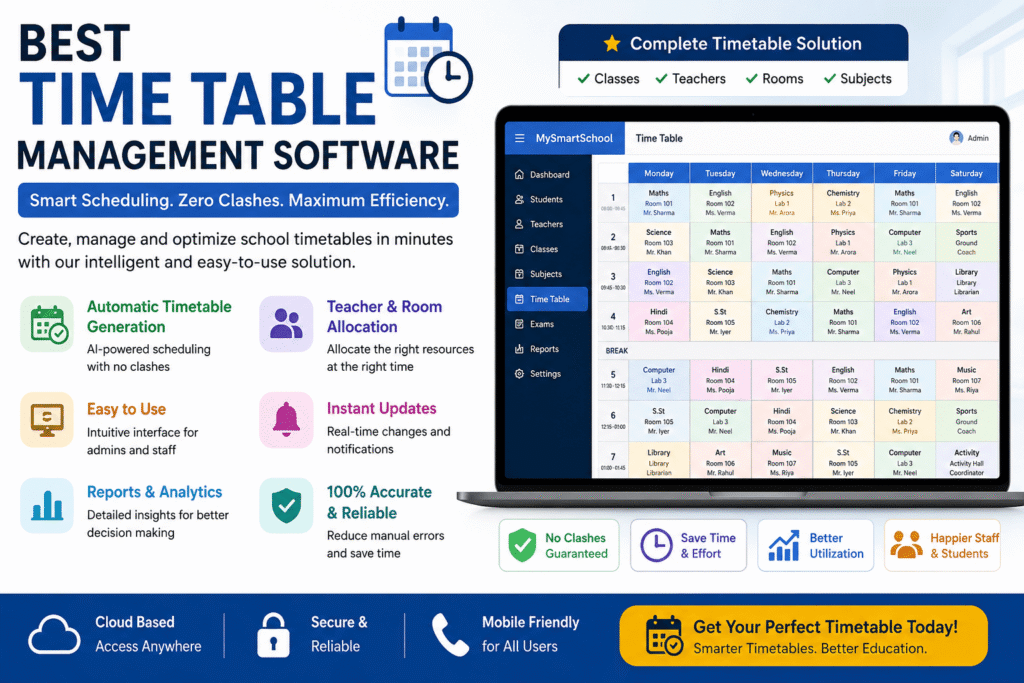
1. Auto-Scheduling Engine
- Ability to process multiple hard and soft constraints simultaneously and generate a conflict-free timetable automatically.
- Hard constraints must be non-negotiable—no teacher double-booked, no room assigned twice, and no subject below the mandated period count.
- Soft constraints should be configurable—teacher preferences, period distribution across the week, and free period placement.
2. Teacher Management
- Comprehensive teacher profile setup—subjects qualified to teach, classes assigned, maximum periods per day and per week, and preferred and blocked time slots.
- Workload visualization—a clear view of how periods are distributed across the teaching staff, with alerts when any teacher approaches or exceeds workload limits.
- Consecutive period limits — configurable rule that prevents a teacher from being assigned more than a set number of back-to-back teaching periods.
- Split shift avoidance — soft constraint to keep a teacher’s periods grouped within one part of the day where possible, rather than scattered across morning and afternoon.
- Guest Faculty and part-time teacher support — the ability to schedule teachers who are only available on specific days or within specific time windows.
3. Room & Infrastructure Management
- Every room, lab, and shared space entered as a schedulable resource with defined capacity and type (general classroom, science lab, computer lab, smart room, library, playground).
- The system strictly prevents two classes from using the same lab at the same time.
- The dashboard shows over-allocated, under-used, and unavailable rooms for specific days.
- Special room requirements per subject—Chemistry requires Lab 1, and Computer Science requires the computer lab—are configurable at the subject level so the engine assigns them automatically.
- Support for split-campus or multi-building schools where travel time between buildings is a real constraint.
4. Ease of Use & Setup
- Intuitive data entry for master data—class sections, subjects, teachers, and rooms—with bulk import support via Excel or CSV for schools migrating from existing systems.
- Visual timetable editor drag-and-drop interface for manual adjustments with real-time conflict highlighting.
- Undo and version history — the ability to roll back to a previous timetable version if a change causes cascading problems.
- Low learning curve for non-technical users — the academic coordinator, not the IT team, will use this daily.
Know more features about the timetable management system.
Typical Price Ranges in 2026
Standalone timetable tools
(dedicated scheduling software only, no ERP): ₹15,000 – ₹80,000 per school per year depending on school size, number of sections, and feature tier.
ERP-bundled timetable modules
(Timetabling as part of a broader school management suite): ₹40,000 – ₹250,000 per year for the full ERP, with the timetable module included. The timetable feature alone cannot be purchased separately; it will come with the whole school ERP package.
If you want only time-table generation software, there is no need to buy the whole package, as it would be very expensive as compared to only the time-table module.
Buy a separate timetable module at an affordable price.
Open-source tools
(FET, OpenTimetable): Free to download and use. Implementation, hosting, and customization costs vary—expect to spend ₹10,000 – ₹30,000 on setup if you engage a local vendor to configure it, or nothing if your IT team handles it in-house.
Per-student pricing models:
Some newer SaaS tools charge ₹5 – ₹50 per student per year. There also exist some affordable school ERP systems like MySmartSchool at just Rs 5 per student per month.
For a school of 1,200 students, this translates to ₹60,000–₹180,000 per year—reasonable for feature-rich tools and expensive for basic ones.
What Is Included in the Base Price
- Core timetabling and auto-scheduling engine.
- A fixed number of admin user accounts (typically 2–5).
- Email-based customer support.
- Software updates for the contract period.
What Is Often Charged Extra
- Additional admin or teacher portal user licenses beyond the base count.
- SMS or WhatsApp notification credits — usually charged per message sent
- Data migration from your existing system — vendors frequently charge for this separately.
- On-site training — live sessions at your school are usually billable; recorded webinars are typically free.
- Priority or phone support — often locked behind a higher support tier.
Book a free demo with no hidden charges guaranteed software.
Negotiation Tips
- Sign before March: Most Indian school software vendors offer their best pricing to schools that commit before the new academic session begins. A contract signed in January or February typically carries a 10–20% discount over one signed in June.
- Ask for multi-year pricing: A two or three-year contract almost always unlocks a lower annual rate. Useful if you are confident in the product after a trial.
- Negotiate training into the base price: Vendors will frequently include live onboarding sessions at no extra cost if asked directly during negotiation—but rarely volunteer it.
- Use competing quotes: Getting formal quotes from two or three vendors and sharing them transparently with your preferred vendor almost always results in a better offer.
Conclusion
Timetable management in CBSE schools has for too long been treated as a back-office task—something that gets done somehow, by someone, before the new session begins. The reality is that the timetable is the operating system of a school.
The good news is that the tools available in 2026 are genuinely capable of solving this problem well.
Auto-scheduling engines have matured.
CBSE-specific compliance features are no longer rare. Integration with Indian school ERPs has improved significantly.
Don’t Miss: 7 Best Exam Management System Software for Schools in India — 2026 Edition
Also see Handy Guide About Report Card Management System.